> For the complete documentation index, see [llms.txt](https://wiki.thescriptersguild.com/llms.txt). Markdown versions of documentation pages are available by appending `.md` to page URLs; this page is available as [Markdown](https://wiki.thescriptersguild.com/knowledge/scripting/guides-and-info/ui-nav-markers-must-be-enabled-each-round.md).
# UI Nav Markers Must Be Enabled Each Round
UI Nav Markers must be re-enabled with the Set Nav Marker Enabled node at the start of every round.
Navigation markers implemented in Forge may appear to stop functioning once a round concludes. This behavior is expected and can be addressed by refreshing the marker status for each new round.
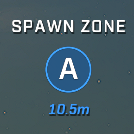
A UI Nav Marker displays a name, icon and its distance to the player.
## Marker Persistence
When designing navigation systems, developers can build a list of UI Nav Markers at the start of the game. This list is not cleared when a round ends, meaning the same marker references remain valid and can be accessed in subsequent rounds.
## Refreshing Markers
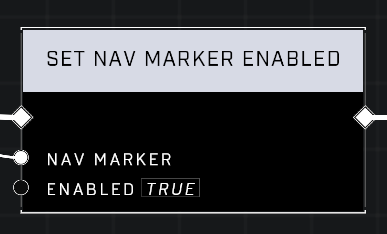
Because markers do not automatically reactivate when a new round begins, the [Set Nav Marker Enabled](/scripting/nodes/ui-nav-markers/set-nav-marker-enabled.md) node must be used to make them visible again.
### Implementation Workflow
To maintain functional markers throughout a match, the following workflow is recommended:
* **Game Start**: Create and store a list of all necessary UI Nav Markers.
* **Round Start**: Iterate through the stored list and pass each marker into the `Set Nav Marker Enabled` node.
The Set Nav Marker Enabled node is used to toggle the visibility of a marker.
{% hint style="info" %}
Since the list of UI Nav Markers persists across rounds, you do not need to rebuild the list at the start of every round, but they must be re-enabled every round.
{% endhint %}
***
## Source Data
* Discord thread: [UI Nav Markers need to be Enabled each round](https://discord.com/channels/220766496635224065/1422050068667826237/1422050068667826237)
#### Contributors
Okom