# Restore Player Shield Instantly

<figure><img src="/files/kFsqDSFNa3XnlNitRwNU" alt="Cover image"><figcaption></figcaption></figure>

While standard shield regeneration typically occurs over time, it is possible to bypass this process through scripting. By manipulating overshield nodes or recharge traits, developers can trigger immediate shield restoration.

## Implementation via Overshield Node

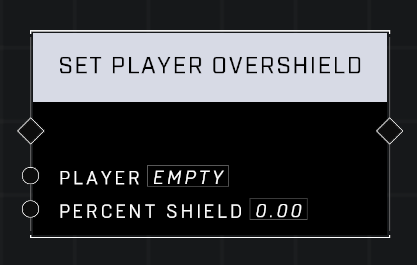
The most effective way to restore a shield instantly is to use the [Set Player Overshield](/scripting/nodes/players/set-player-overshield.md) node. Although this node is primarily intended to add extra protection, its underlying logic can be leveraged to reset the standard shield bar.

### Node Configuration

To achieve a full shield restoration without adding additional overshield protection, configure the node with the following setting:

* **Percent Shield**: `0.00`

<figure><img src="/files/iseGIO2CXfdUGXwSLEos" alt="Set Player Overshield node"><figcaption><p>The `Set Player Overshield` node configured with a 0.00 percent shield value.</p></figcaption></figure>

## Underlying Mechanics

The ability to use this node for instant regeneration is due to the specific execution order of the overshield logic. When the `Set Player Overshield` node is triggered, the system performs two distinct actions in sequence:

1. The player's current shield is immediately set to its maximum value.
2. The specified overshield amount is then applied on top of that maximum value.

By providing a `Percent Shield` value of `0.00`, the second step adds no additional overshield protection, resulting in only an instant reset to the player's maximum standard shield.

{% hint style="success" %}
This technique is a useful workaround for mechanics that require an immediate "recharge" effect without the player gaining the extra durability associated with overshields.
{% endhint %}

## Alternative Method via Shield Recharge Trait

For a near-instantaneous recharge (approximately 0.2 seconds) without using the overshield node, you can manipulate the [Trait: Shield Recharge](/scripting/nodes/traits-player/trait-shield-recharge.md) node. This method adjusts the timing and speed of the standard regeneration process.

### Implementation

To use this method, you must declare, apply and remove a trait set:

* Use the [Declare Trait Set](/scripting/nodes/traits/declare-trait-set.md) node to create a set containing the shield recharge trait.
* Use the [Apply Player Trait Set](/scripting/nodes/traits-player/apply-player-trait-set.md) node (or its variants) to apply the set to a player.
* Use the [Remove Player Trait Set](/scripting/nodes/traits-player/remove-player-trait-set.md) node to remove the trait once the regeneration has finished.

### Configuration

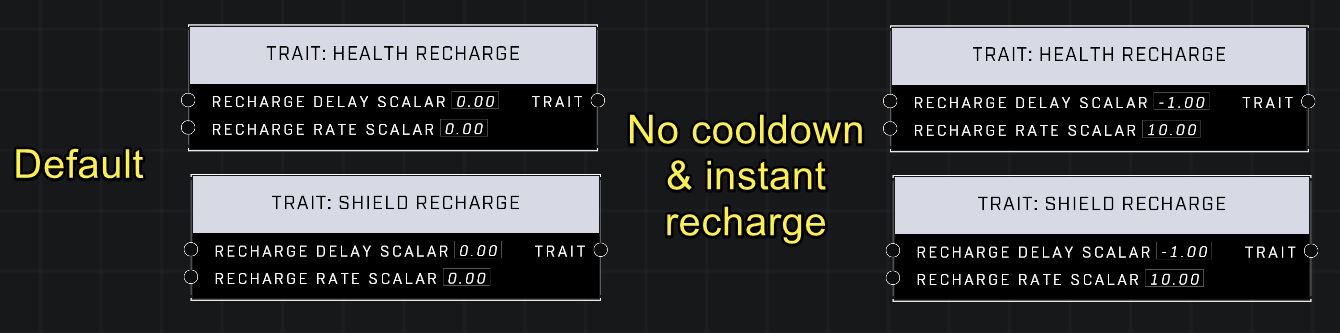
To maximize recharge speed, use the following scalar values (compared to the default 5.000s cooldown and 2.000s recharge):

* **Recharge Delay Scalar**: `-1.00` (results in 0.000 s cooldown)
* **Recharge Rate Scalar**: `10.00` (results in 0.2000 s recharge time)

<figure><img src="/files/LNd2nSX8U8bCS4ZUwYP1" alt="Ideal shield recharge settings"><figcaption><p>Comparison between default trait values and settings for instant shield recharge.</p></figcaption></figure>

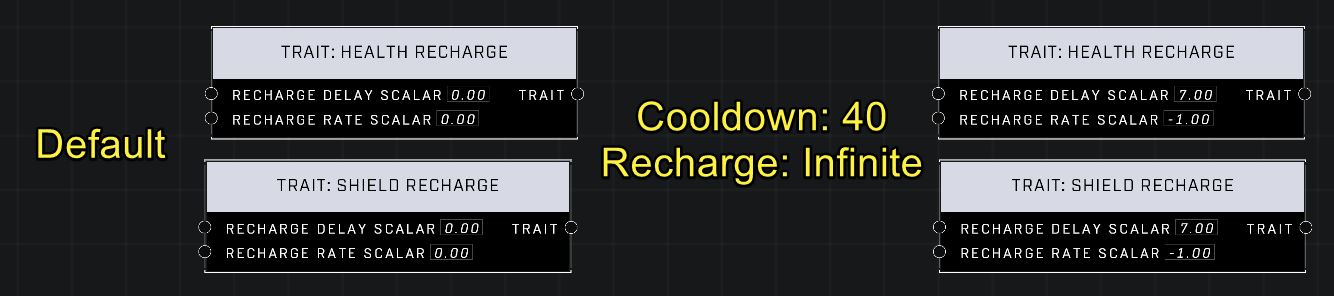
Conversely, extreme values can be used to effectively disable regeneration:

* **Recharge Delay Scalar**: `7.00` or higher (results in 40.000 s cooldown)
* **Recharge Rate Scalar**: `-1.00` (results in infinite recharge time)

<figure><img src="/files/43D6tRIa9rIL3r1Winzz" alt="Extreme shield recharge settings"><figcaption><p>Comparison between default trait values and settings that result in near-infinite recharge times.</p></figcaption></figure>

{% hint style="info" %}
These settings also impact health regeneration, resulting in a 0.000s health cooldown and 0.100s health recharge time.
{% endhint %}

***

## Source Data

* Discord thread: [Restore Player Shield Instantly](https://discord.com/channels/220766496635224065/1478032097200574626/1478032097200574626)

#### <mark style="color:green;">Contributors</mark>

Okom


---

# Agent Instructions: Querying This Documentation

If you need additional information that is not directly available in this page, you can query the documentation dynamically by asking a question.

Perform an HTTP GET request on the current page URL with the `ask` query parameter:

```
GET https://wiki.thescriptersguild.com/knowledge/scripting/guides-and-info/restore-player-shield-instantly.md?ask=<question>
```

The question should be specific, self-contained, and written in natural language.
The response will contain a direct answer to the question and relevant excerpts and sources from the documentation.

Use this mechanism when the answer is not explicitly present in the current page, you need clarification or additional context, or you want to retrieve related documentation sections.