> For the complete documentation index, see [llms.txt](https://wiki.thescriptersguild.com/llms.txt). Markdown versions of documentation pages are available by appending `.md` to page URLs; this page is available as [Markdown](https://wiki.thescriptersguild.com/knowledge/scripting/guides-and-info/line-of-sight-los-within-proximity-to-enemy.md).
# Line of Sight (LoS) Within Proximity to Enemy
A technique for checking if an enemy is both visible and within a specific range of the player using raycasting.
This method determines if an enemy is both within a player's line of sight and within a specified distance threshold. By combining raycasting with distance checks, developers can create boolean states that trigger gameplay mechanics or user interface elements when a target is both visible and nearby.
## Implementation Logic
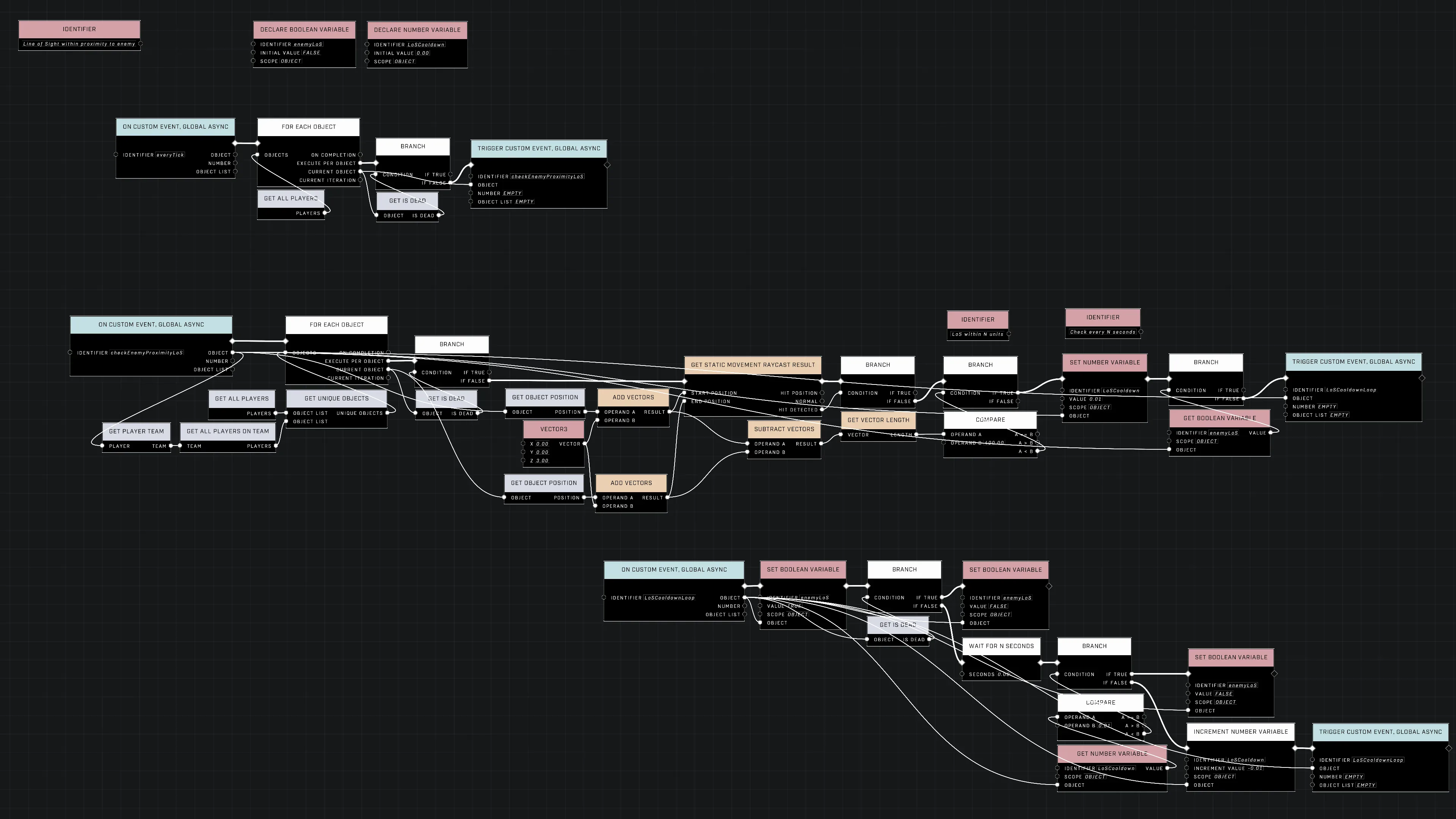
The core functionality relies on two primary checks: verifying that no static objects obstruct the path between the player and the target, and confirming the distance between them is within a set range.
### Raycasting and Distance Checks
To perform the visibility check, use a `Static Movement Raycast` from the player's position to the target enemy's position. Because the raycast is directed specifically between the two players, a `Hit Detected: False` result indicates that no static obstructions are present in the path, confirming a clear line of sight.
If the line of sight is clear, the distance between the player and the target is compared to a desired range. The check only returns true if the target is both visible and within that specified proximity.
### Managing State with Decay Timers
A cooldown loop can be implemented using an adjustable timer to manage the "decay time" of the line of sight boolean. This allows the state to persist for a short duration even after the line of sight is broken.
{% hint style="info" %}
The timer setting affects how quickly the boolean turns off; a value as low as 0.10 s provides nearly instant feedback, while a higher value like 5 s allows the state to remain active for several seconds after visibility is lost.
{% endhint %}
## Demonstrating Proximity and Visibility
The following demonstration shows the vision prompt appearing and disappearing based on the combined proximity and line of sight requirements.
The vision prompt appears when the enemy is within range and in line of sight.
{% file src="/files/Uy3KgdXhz2jn6Z2YYVNE" %}
A demonstration of the vision prompt functioning based on proximity and line of sight.
{% endfile %}
The [Player LoS proximity demo](https://www.halowaypoint.com/halo-infinite/ugc/maps/057958d3-988c-43c9-a849-0becf2838164) provides further context for this setup.
## Debugging and UI Optimization
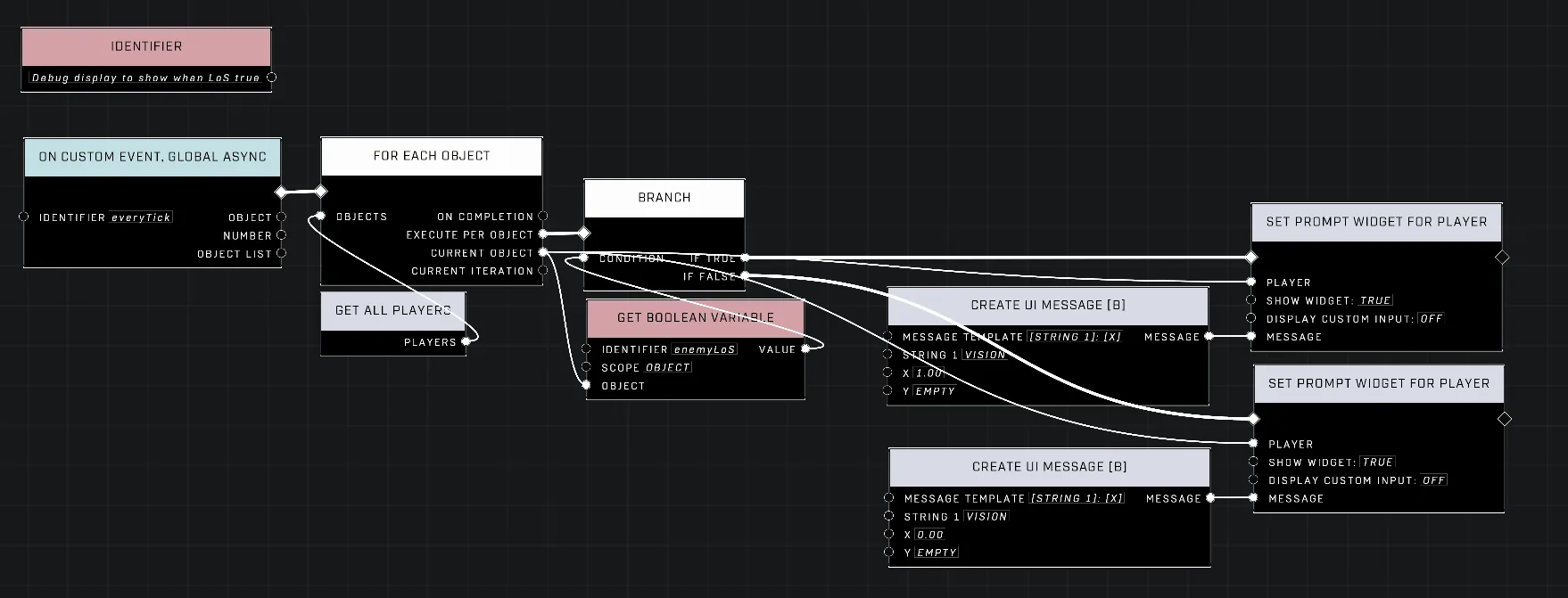
A script can be used to display the real-time status of the line of sight boolean for each player to assist with testing.
A script used to display the real-time status of the line of sight boolean for each player.
### UI Prompt Optimization
When displaying a vision prompt, rather than using a [Branch](/scripting/nodes/logic/branch.md) node to toggle between two [Create UI Message](/scripting/nodes/ui/create-ui-message.md) nodes (to show "1" or "0"), it is more efficient to feed the boolean variable directly into the `show widget` parameter of a [Set Prompt WIdget For Player](/scripting/nodes/ui/set-prompt-widget-for-player.md) node. This allows the widget to appear and disappear automatically based on the boolean state, creating a more noticeable and cleaner visual transition.
***
## Source Data
* Discord thread: [Line of Sight (LoS) Within Proximity to Enemy](https://discord.com/channels/220766496635224065/1508533080988713210/1508533080988713210)
#### Contributors
Okom\
swagonflyyyy (Mr. Blackwell)