> For the complete documentation index, see [llms.txt](https://wiki.thescriptersguild.com/llms.txt). Markdown versions of documentation pages are available by appending `.md` to page URLs; this page is available as [Markdown](https://wiki.thescriptersguild.com/knowledge/scripting/guides-and-info/hiding-player-name-visibility.md).

# Hiding Player Name Visibility

<figure><img src="/files/kFsqDSFNa3XnlNitRwNU" alt="Cover image"><figcaption></figcaption></figure>

While player names are typically fixed in Halo Infinite, scripting provides an unconventional way to remove a specific player's name globally for all players.

## Hiding a Player's Name

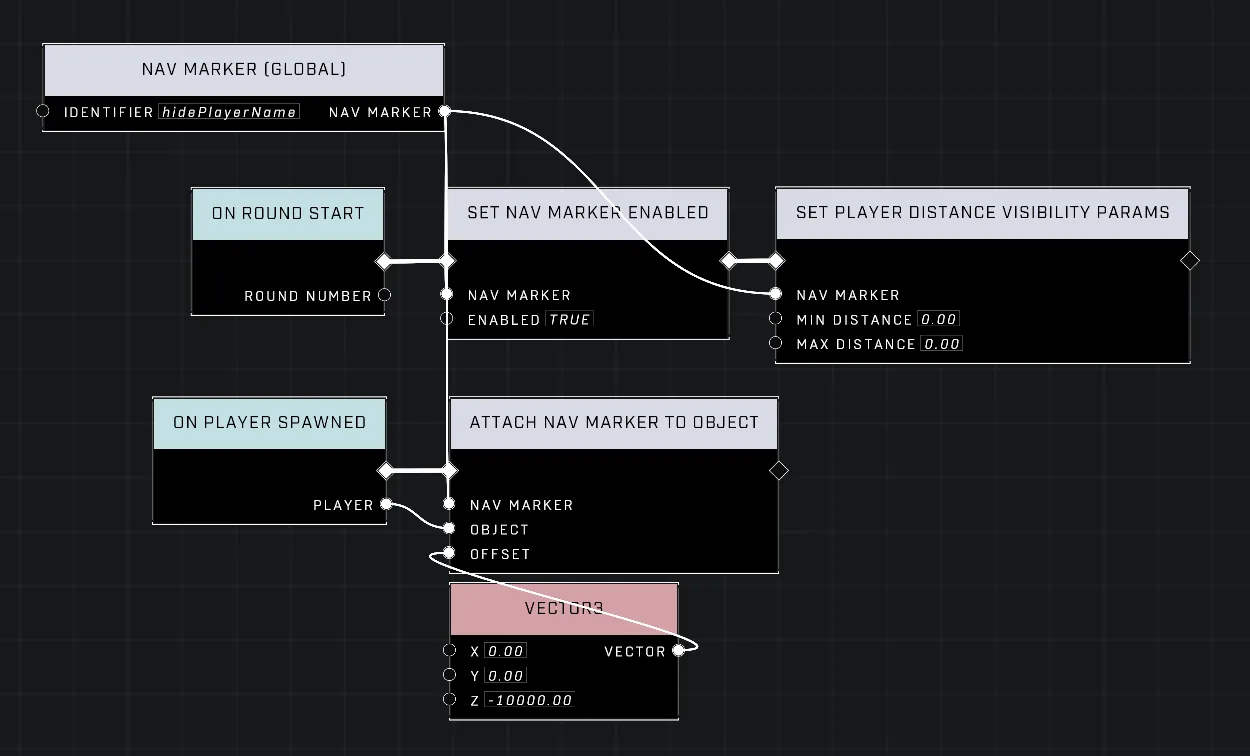
To remove a player's name, a Nav Marker must be attached to that player using the [Attach Nav Marker To Object](/scripting/nodes/ui-nav-markers/attach-nav-marker-to-object.md) node. In custom games, this action inherently overrides the player's name.

### Hiding the Nav Marker

Because an attached Nav Marker remains visible and follows the player, its visibility must be adjusted to ensure it does not appear. This is achieved by using the [Set Player Distance Visibility Params](/scripting/nodes/ui-nav-markers/set-player-distance-visibility-params.md) node on the Nav Marker with the following settings:

* Min Distance: 0.00
* Max Distance: 0.00

This configuration clamps the visible viewing distance to 0, effectively making the Nav Marker hidden at all times. This technique works in both team-based modes and free-for-all modes where FFA Allegiance is utilized to create allied teammates.

{% hint style="info" %}
To prevent player marks from hitting the invisible Nav Marker—which can occur when marking or for the player being marked—adjust the Nav Marker's offset to `Z: -10,000`. This moves the marker out of the way while still allowing it to override the player's name.
{% endhint %}

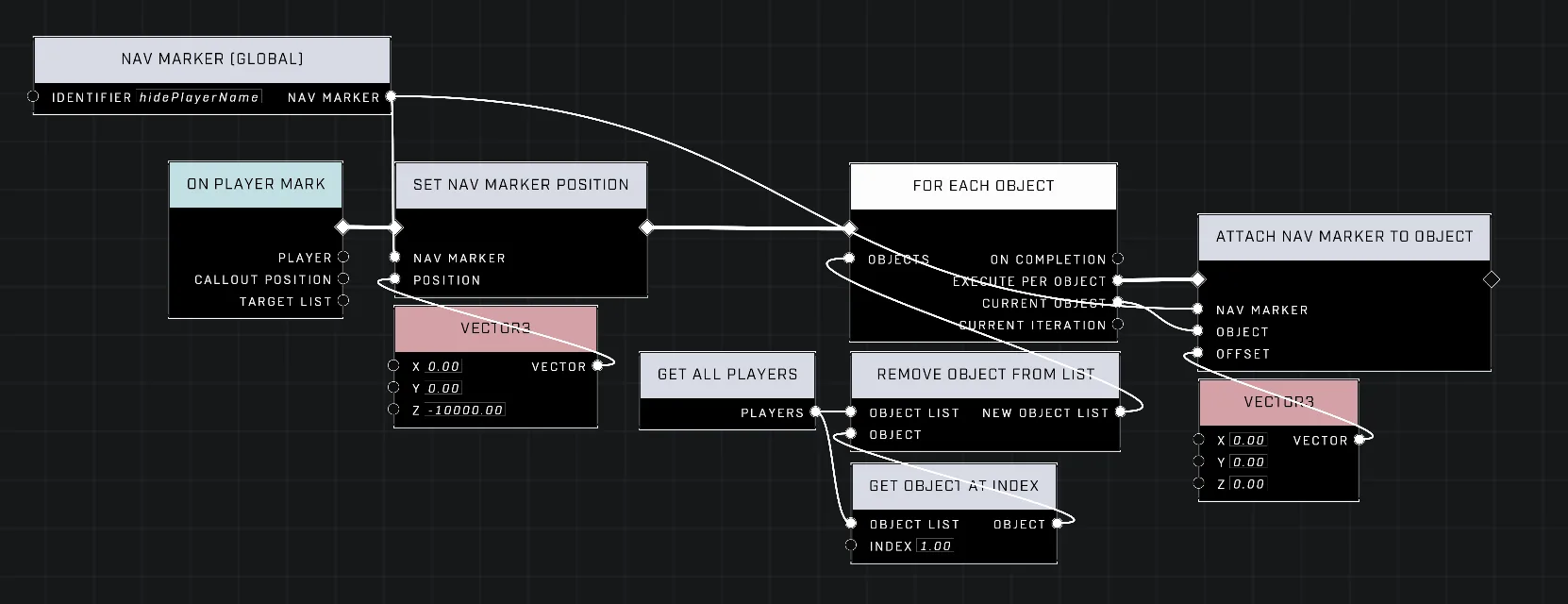
<figure><img src="/files/8sAzVbWRZO3b0Ru9znkH" alt="hide-player-name-script.png"><figcaption><p>The required scripting nodes for removing the player name.</p></figcaption></figure>

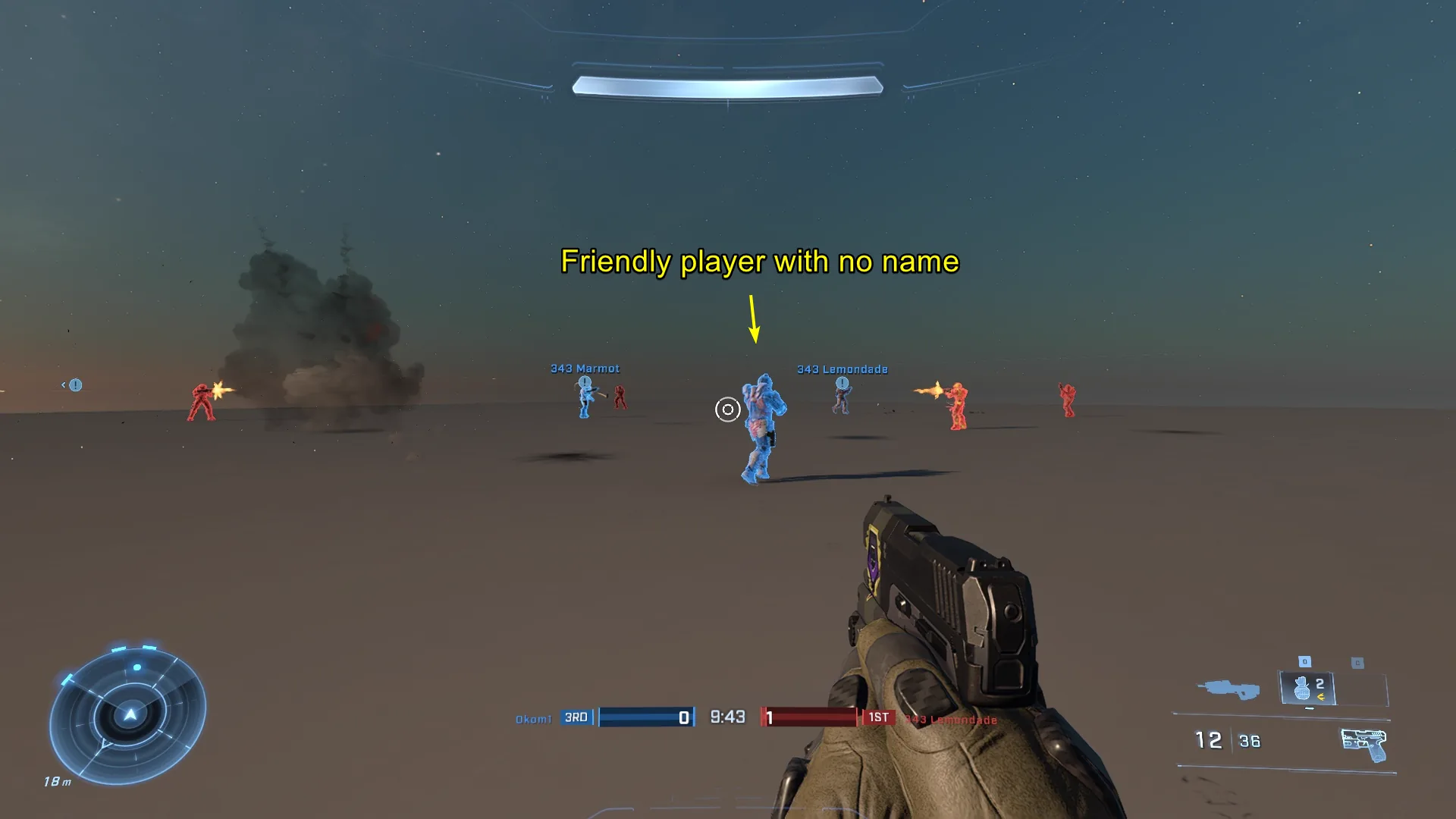
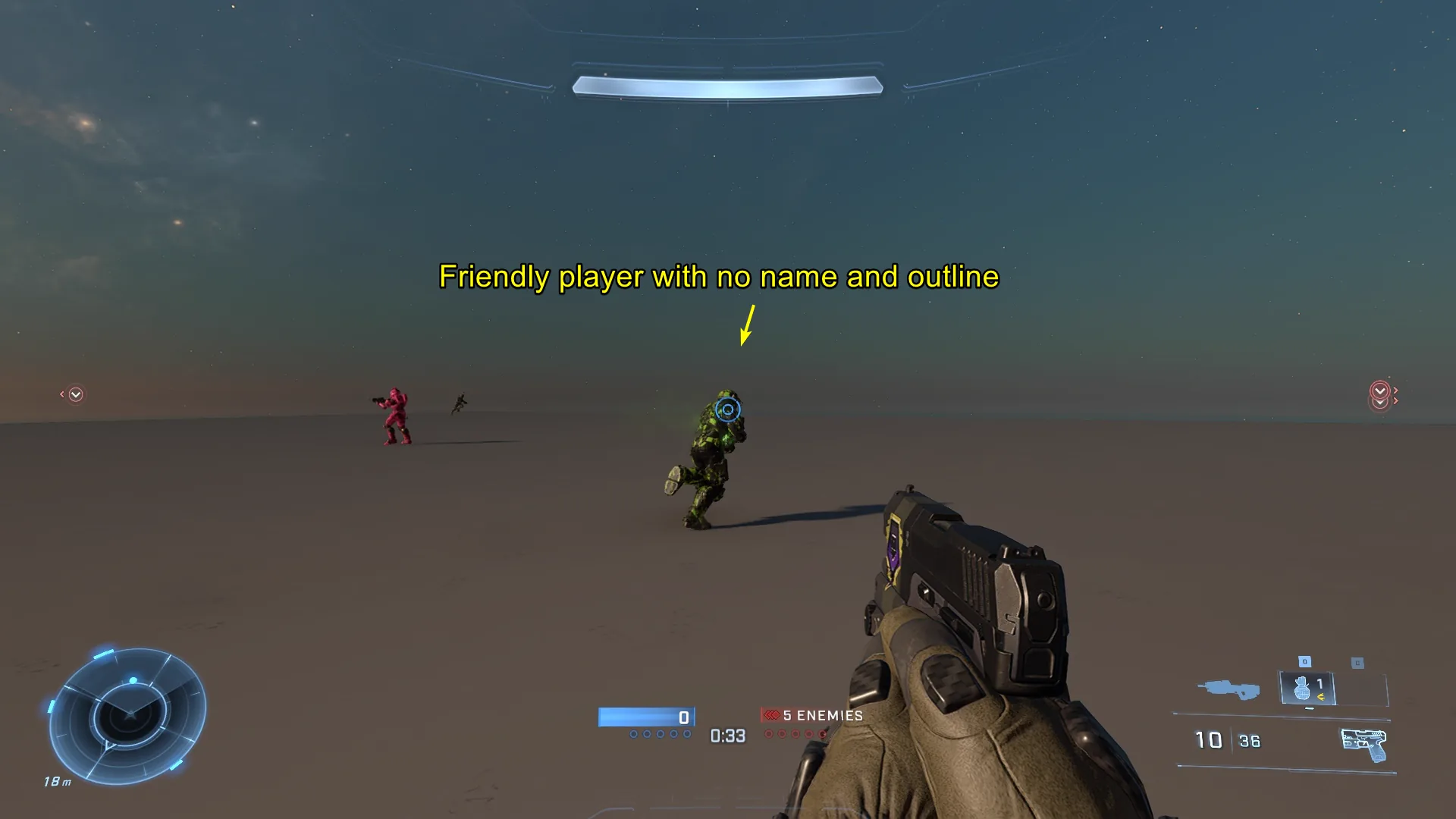
<figure><img src="/files/CYZlMzyuD20GwXgqP6EM" alt="2026-08-23_JPEGView-rkKj.jpg"><figcaption><p>A friendly player's name is hidden.</p></figcaption></figure>

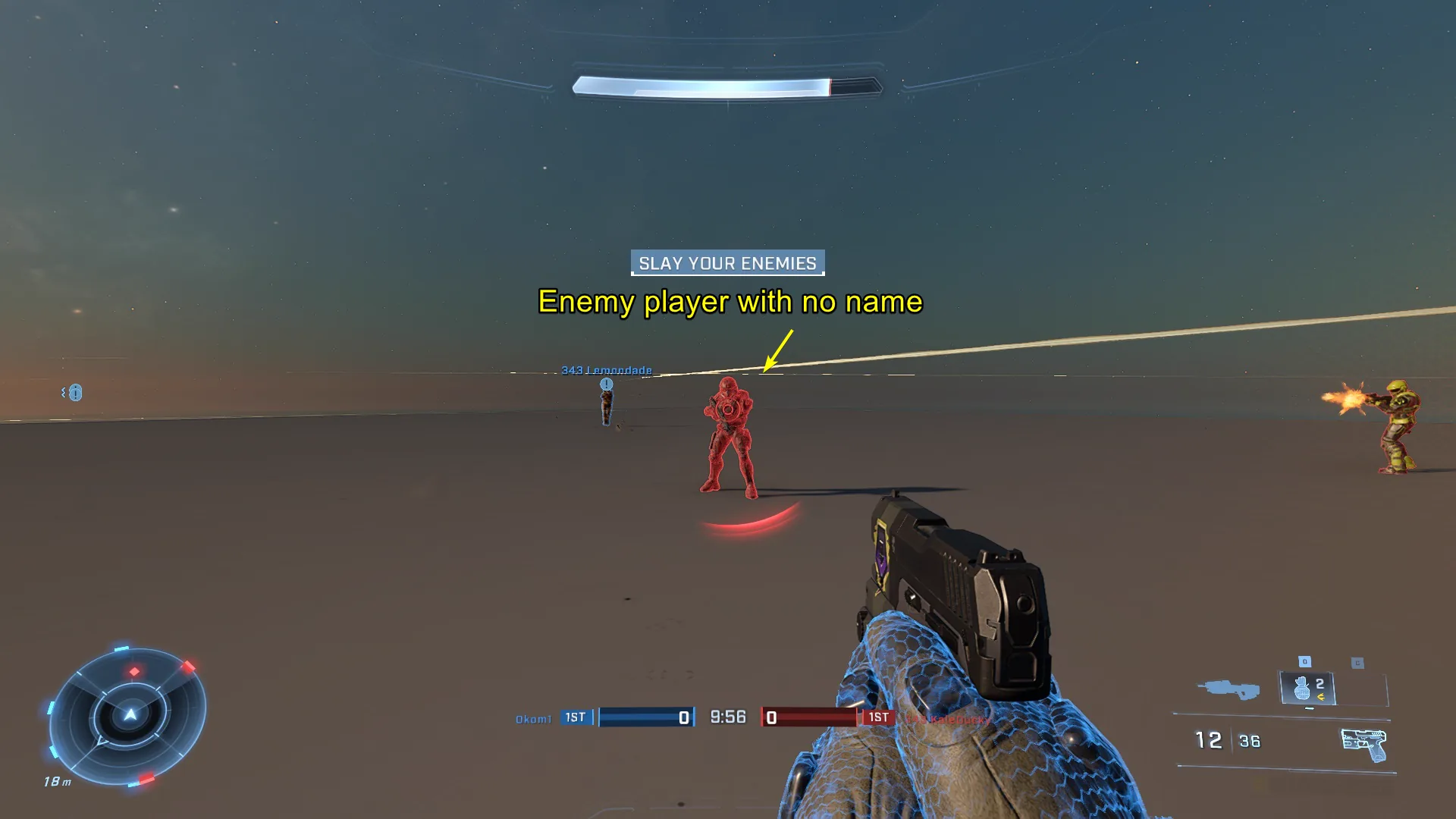
<figure><img src="/files/hy2sleHaEor9o3DTenSR" alt="2026-08-23_JPEGView-kTvu.jpg"><figcaption><p>An enemy player's name is hidden.</p></figcaption></figure>

{% hint style="warning" %}
The effect of the player name disappearing cannot be previewed in Forge mode, and only works in a custom game.
{% endhint %}

## Restoring Player Name Visibility

To show a player's name again after hiding it with the Nav Marker attachment method, the Nav Marker must be detached from the player. The only ways to detach a Nav Marker from an object are to have the object despawn or to adjust the position of the Nav Marker.

Since we don't want to kill the player, we'll need to adjust the Nav Marker's position with the [Set Nav Marker Position](/scripting/nodes/ui-nav-markers/set-nav-marker-position.md) node. The inconvenient feature here is if the same Nav Marker had been attached to multiple players, it will also detach from multiple players when the Nav Marker's position is updated. To practically remove the Nav Marker from just one desired player, it must first be detached from all players, and then reattached to all players other than the desired player.

<figure><img src="/files/QCfX2aEReXTgC9yOTBG4" alt="detach-one-nav.png"><figcaption><p>An example of detaching a Nav Marker from an object.</p></figcaption></figure>

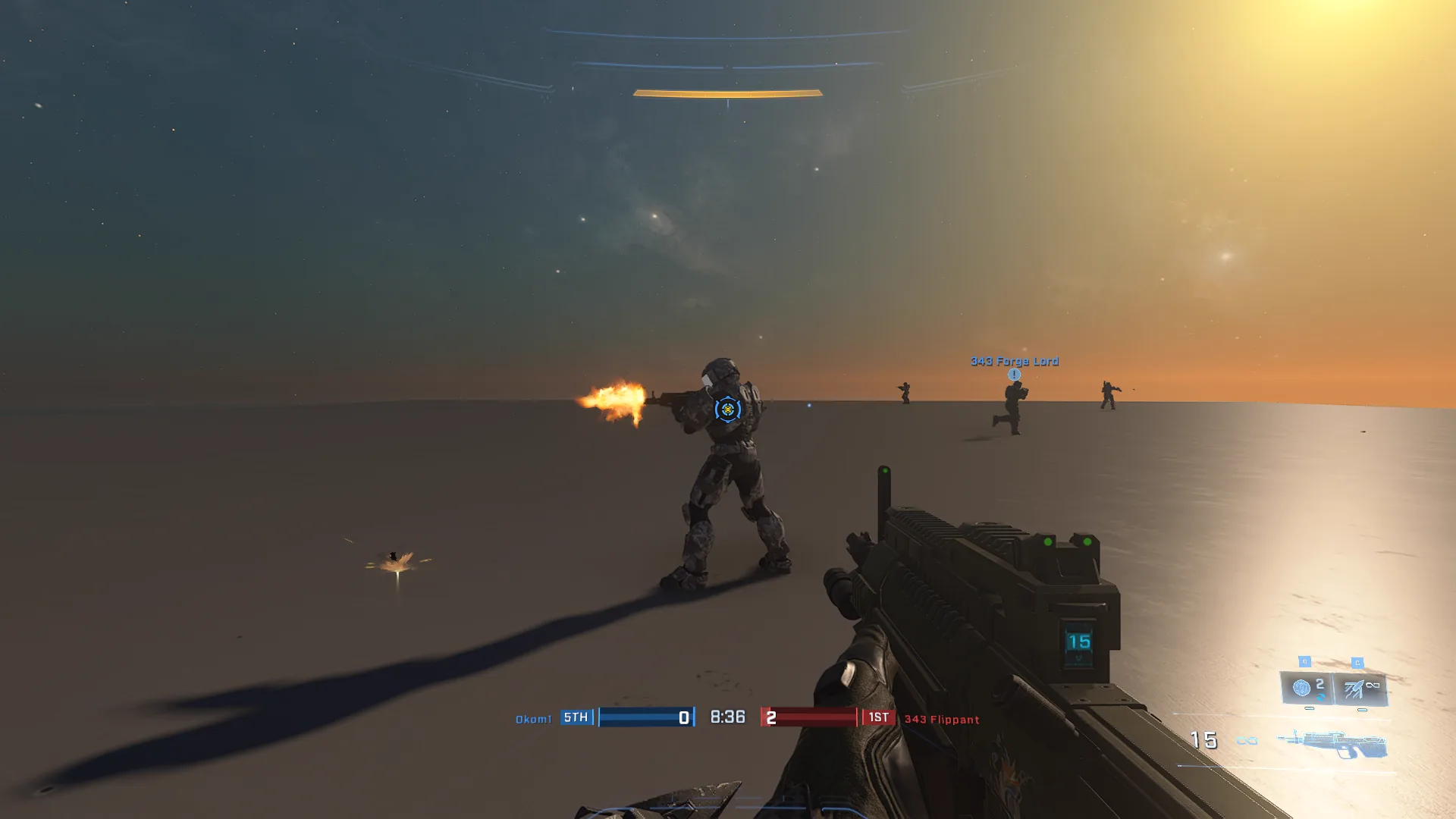
<figure><img src="/files/nzZEhvlcsmNXtIfsCaBA" alt="2026-08-23_HaloInfinite-ArTw.jpg"><figcaption><p>A background player has their name successfully returned.</p></figcaption></figure>

## Removing Player Outlines

As an additional option, player outlines can be removed via the mode settings of the loaded mode using the following configurations in order to achieve a uniquely clean player UI, without any adjustments to players' local HUD settings:

* `HUD → Friendly Player Outlines`: Off
* `HUD → Enemy Player Outlines`: Off

<figure><img src="/files/ZlkEvLRqvRbfg6wVRTEm" alt="2026-08-23_JPEGView-05IJ.jpg"><figcaption><p>The mode settings used to disable player outlines.</p></figcaption></figure>

***

## Source Data

* Discord thread: [Hiding Player Name Visibility](https://discord.com/channels/220766496635224065/1541139305098125343/1541139305098125343)

#### <mark style="color:green;">Contributors</mark>

Okom


---

# Agent Instructions
This documentation is published with GitBook. GitBook is the documentation platform designed so that both humans and AI agents can read, navigate, and reason over technical content effectively. Learn more at gitbook.com.

## Querying This Documentation
If you need additional information that is not directly available in this page, you can query the documentation dynamically by asking a question.

Perform an HTTP GET request on the current page URL with the `ask` query parameter, and the optional `goal` query parameter:

```
GET https://wiki.thescriptersguild.com/knowledge/scripting/guides-and-info/hiding-player-name-visibility.md?ask=<question>&goal=<endgoal>
```

`ask` is the immediate question: it should be specific, self-contained, and written in natural language.
`goal` is optional and describes the broader end goal you are ultimately trying to accomplish on behalf of the user. GitBook uses it to tailor the answer towards what is most useful for that goal.

The response will contain a direct answer to the question and relevant excerpts and sources from the documentation.

Use this mechanism when the answer is not explicitly present in the current page, you need clarification or additional context, or you want to retrieve related documentation sections.