> For the complete documentation index, see [llms.txt](https://wiki.thescriptersguild.com/llms.txt). Markdown versions of documentation pages are available by appending `.md` to page URLs; this page is available as [Markdown](https://wiki.thescriptersguild.com/forge/modes/capture-the-flag/capture-the-flag-old.md).
# Capture The Flag (old)
## Capture the Flag
Capture the Flag (CTF)
### Required Items
* Flag Spawn
* Flag Delivery Plate
### Supported Game Modes
* Arena
* Big Team Battle (BTB) Flag
* One (1) Flag (Attack / Defend)
* Neutral Flag
{% hint style="info" %}
Flag Spawn and Flag Delivery Plate can be found in the Object Browser.
Object Browser > Gameplay > Game Modes
{% endhint %}
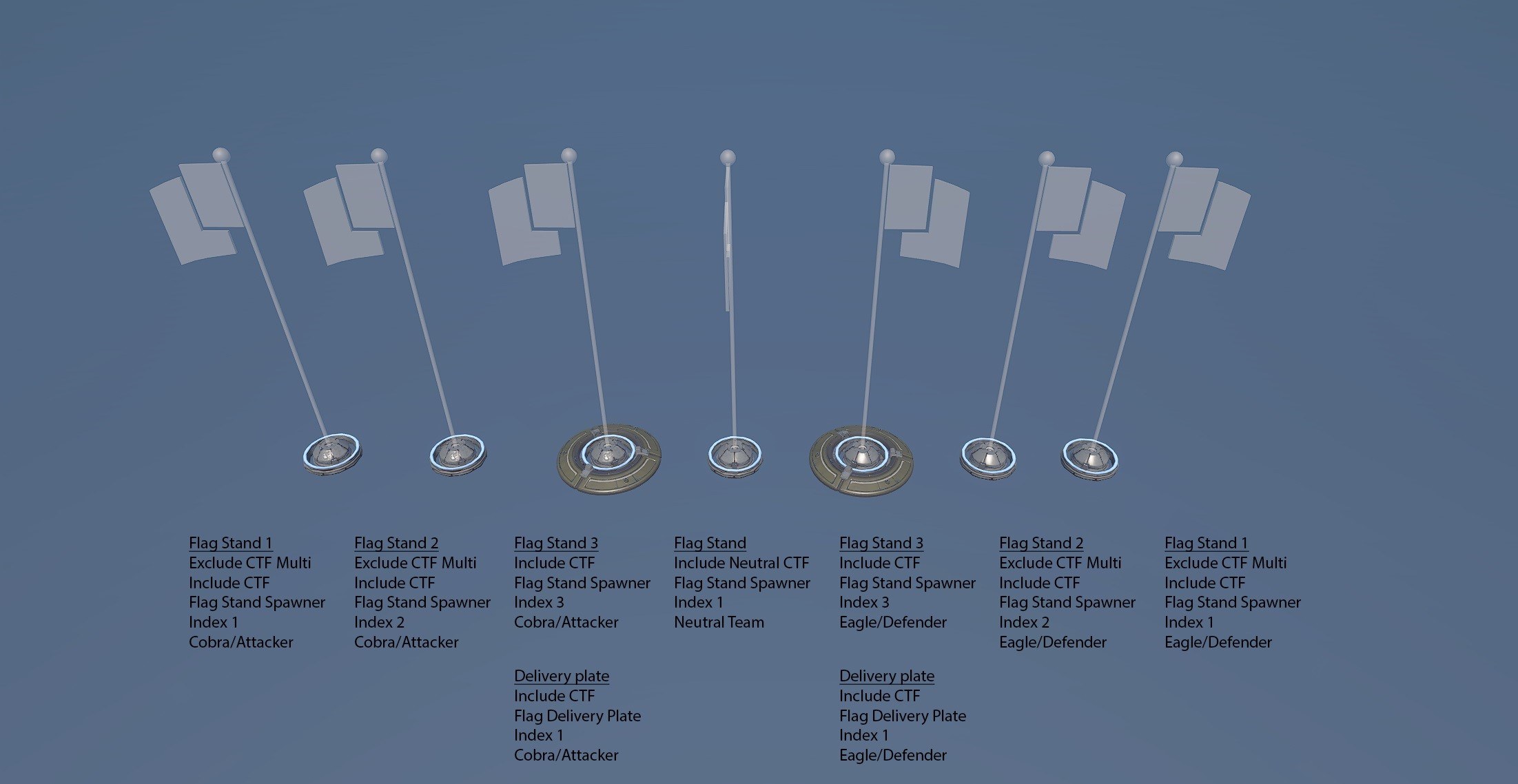
Capture the Flag Setup Overview
### Game Mode Knowledge and Understanding
When playing Capture the Flag (CTF) in Arena, it auto detects two Flag Spawns (Stands) and two Flag Delivery (Capture) Plates and will not spawn the other stands. Playing Capture the Flag in Big Team Battle, it detects all mode objects. This is also true for Neutral Flag game mode.
Big Team Battle Capture the Flag (CTF) is pretty similar to regular Arena Flag except there are three Flag Spawns. Only one flag is active at a time and will only change flag spawn location when the enemy team captures the flag.By having three flag spawns, this will create different gameplay experiences throughout the entirety of the match. Strategically place the flag spawners in locations that will create an unique combat experiences and add a level of difficulty to overtake from your opponents.
Fragmentation 3 BTB Flag Setup and Experience
The first flag is easier for a vehicle to steal the flag along with it being further away from the base. The second flag location is under the base and is a little hard to steal but CQC weapon setup has the upper advantage setup here. The third flag location is located on the base and is harder to steal. It has visible sight lines from all angles that help prevent attackers from easily taking the flag from the stand. When placing the flags in different locations, think about what kind of experiences you want the players (attack/defense) to have.
### Setup
{% hint style="info" %}
If the map is only designed for Arena Flag, Flag Stands 1 and 2 are not needed. Having all three flag spawns are only needed Big Team Battle CTF will be played.
{% endhint %}
If attacker or defender is referenced in the game mode,
* Team 1 (Eagle) = DEFENDER
* Team 2 (Cobra) = ATTACKER
Setting up Capture the Flag game mode, One Flag will work by default. Keep this in mind when setting up the teams, as it will be crucial to know where to place attacker vs defender game mode objects.
#### Object Properties Setup
{% hint style="info" %}
Settings will be applied in the Object Properties of the menu of each object.
{% endhint %}
**Flag Spawn (Stand) 1**
* Gameplay
* Labels:
* **Exclude CTF Multi**
* **Include CTF**
* **Flag Stand Spawner**
* Team: **Set to desired team (Eagle or Cobra)**
* Advanced Properties
* Flag Index: **1**
**Flag Spawn (Stand) 2**
* Gameplay
* Labels:
* **Exclude CTF Multi**
* **Include CTF**
* **Flag Stand Spawner**
* Team: **Set to desired team (Eagle or Cobra)**
* Advanced Properties
* Flag Index: **2**
**Flag Spawn (Stand) 3**
* Gameplay
* Labels:
* **Include CTF**
* **Flag Stand Spawner**
* Team: **Set to desired team (Eagle or Cobra)**
* Advanced Properties
* Flag Index: **3**
**Neutral Flag Spawn (Stand)**
* Gameplay
* Labels:
* **Include Neutral CTF**
* **Flag Stand Spawner**
* Team: **Neutral**
* Advanced Properties
* Flag Index: **1**
**Flag Delivery Plate**
{% hint style="info" %}
Must include one Flag Delivery Plate per team
{% endhint %}
* Gameplay
* Labels:
* **Include CTF**
* **Flag Deliver Plate**
* Team: **Set to desired team (Eagle or Cobra)**
* Advanced Properties
* Delivery Index: **1**
{% hint style="info" %}
Flag Spawn (Stand) 3 - Should be paired with the Flag Delivery plate.
See Reference Image Capture the Flag Setup Overview - Flag Stand 3
{% endhint %}
### Useful Information
Giving forgers the capability to add a multitude of labels, allows the map to be diversely setup rather than having multiple variants of the same map tailored to a specific game mode.
The default CTF game mode setup above, the label “Include CTF” will set the object to spawn for **ALL CTF MODES**. There are now several new labels that can help determine whether the object should be included into the game mode. If there is a need to separate objects for each CTF variant (One Flag, BTB Flag, Neutral Flag, Multi Flag, Rank), the option is now there.
Better understanding of the use of CTF labels in the Object Properties.
| Label Name | Description |
| ------------------- | ---------------------------------------------------- |
| Include CTF | Object will spawn in all CTF game modes |
| Include Ranked | Object will spawn in Ranked game modes |
| Include CTF Multi | Object will only spawn in Multi CTF (Cobra vs Eagle) |
| Include CTF Neutral | Object will only spawn in Neutral Flag CTF |
| Include CTF One | Object will only spawn in One Flag CTF |
| Include BTB | Object will only spawn in BTB Flag CTF |
| Exclude CTF | Object will NOT spawn in all CTF game modes |
| Exclude Ranked | Object will NOT spawn in Ranked game modes |
| Exclude CTF Multi | Object will NOT spawn in Multi CTF (Cobra vs Eagle) |
| Exclude CTF Neutral | Object will NOT spawn in Neutral Flag CTF |
| Exclude CTF One | Object will NOT spawn in One Flag CTF |
| Exclude BTB | Object will NOT spawn in BTB Flag CTF |